

Core Concepts
Essential concepts for integrating and building with Sentra API.
How Users Work
The system uses a hierarchical structure to manage users, recipients, and payment methods.
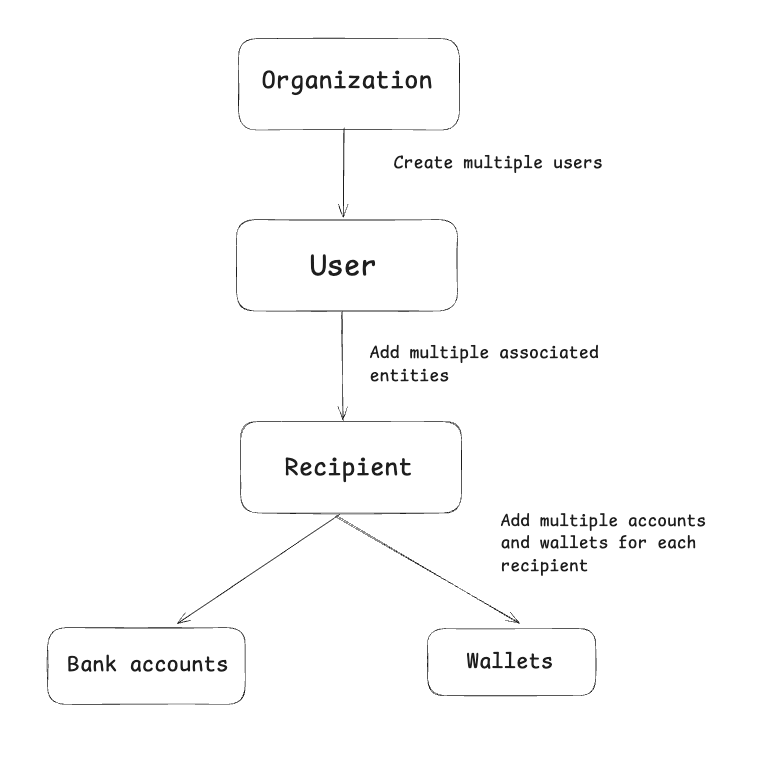
Users
Users are the primary account holders in Sentra. They can be:
- INDIVIDUAL - Personal accounts for individual users
- BUSINESS - Business accounts for companies and organizations
Each user must complete verification before processing payments: individuals must complete KYC (Know Your Customer), while businesses must complete KYB (Know Your Business). Status progresses through these stages:
NOT_STARTED→STARTED→SUBMITTED→UNDER_REVIEW→APPROVEDorREJECTED
Only users with APPROVED KYC status can initiate or receive payments.
Recipients
Recipients are beneficiaries who can have multiple accounts linked to them for receiving funds. Each user can have multiple recipients, and recipients can be:
- FIRST_PARTY - The recipient is the same person as the user (self-transfers)
- THIRD_PARTY - The recipient is a different person or business
Recipients can also be:
- INDIVIDUAL - Personal recipients
- BUSINESS - Business recipients
Linked Accounts and Corridors
Each recipient must have at least one linked account to receive payments. Recipients can have two types of linked accounts:
Bank Accounts - For receiving fiat currency across multiple geographies
- Link bank accounts in any of our supported countries
- Each account supports specific payment corridors (routes between countries and currencies)
- Recipients can link multiple bank accounts in different currencies and countries
Crypto Wallets - For receiving cryptocurrency
- Support multiple blockchain networks
- Each wallet is specific to one chain
A single recipient can have multiple bank accounts across different geographies and multiple crypto wallets on different chains, providing flexible payment routing options.
How Payments Work
Sentra supports two types of payment flows: On-Ramp (fiat to crypto) and Off-Ramp (crypto to fiat). Both follow a similar process with rate, quotes and transfers.
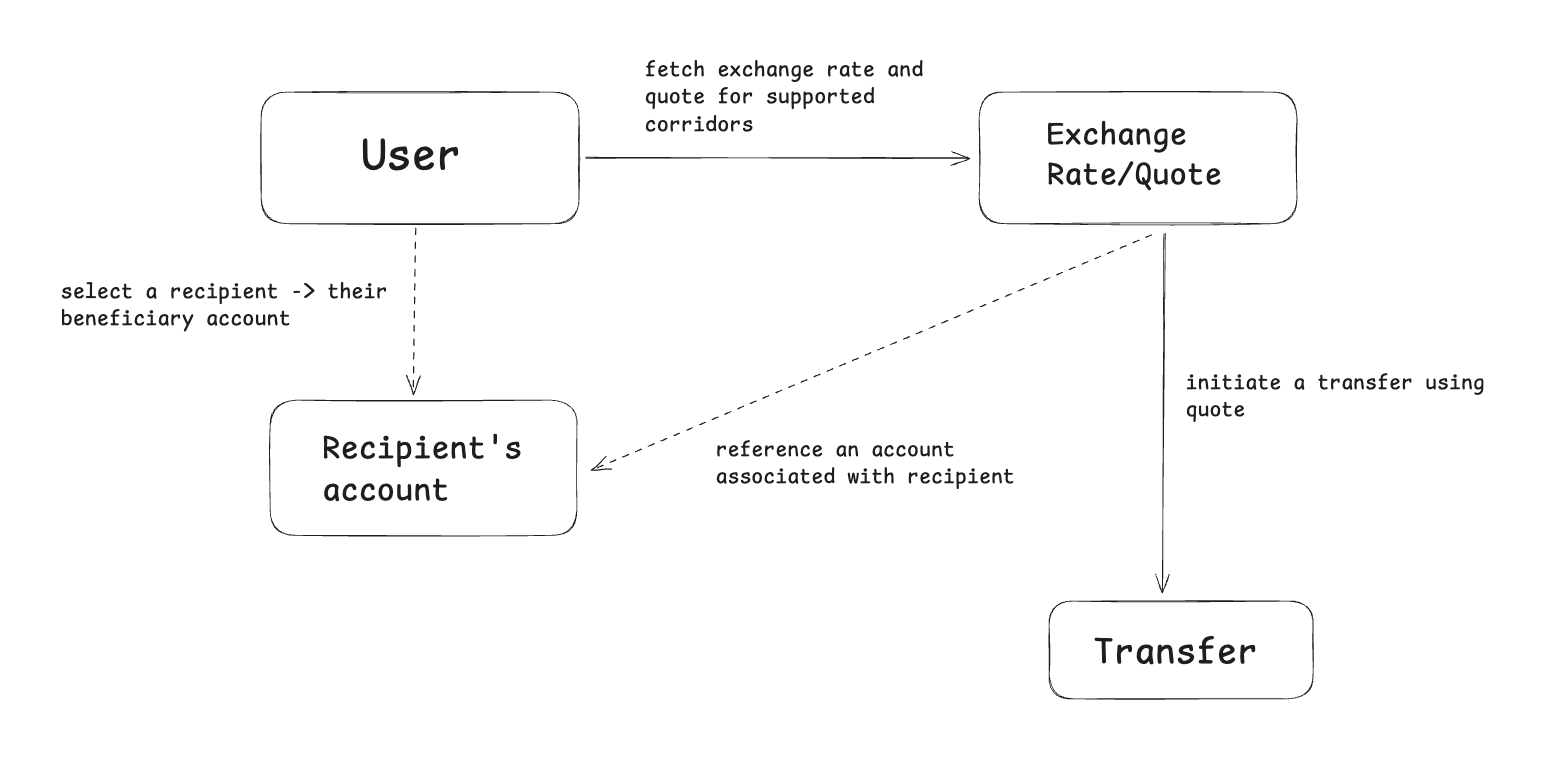
Payment Flow Overview
All payments follow these essential steps:
- Get Exchange Rate - Check current rates and fees (optional, for preview)
- Create Quote - Lock in an exchange rate
- Create Transfer - Initiate the payment transfer
- Process Payment - Complete the actual funds transfer
- Track Status - Monitor payment through various status stages
On-Ramp Payments (Fiat → Crypto)
On-ramp payments convert fiat currency from bank accounts into cryptocurrency in wallets.
Process:
- Get Exchange Rate - Query current USD to USDC rate, for example
- Create Quote - Lock in the rate for conversion
- Create On-Ramp Transfer - Initiate the transfer with bank account and wallet details
- User Sends Fiat - User sends fiat to provided bank account
- Receive Crypto - Recipient wallet receives the converted crypto amount
Key Points:
- User sends fiat first (via bank transfer)
- API provides deposit instructions with a critical reference number
- Crypto is sent to the wallet after fiat is received and verified
- Processing time depends on the payment rail and corridor
Off-Ramp Payments (Crypto → Fiat)
Off-ramp payments convert cryptocurrency into fiat currency.
Process:
- Get Exchange Rate - Query current USDC to USD rate, for example
- Create Quote - Lock in the rate for conversion
- Create Off-Ramp Transfer - Initiate the transfer with wallet and bank account details
- User Sends Crypto - User sends crypto to provided deposit address
- Complete Transfer - User provides transaction hash to confirm crypto receipt
- Receive Fiat - System converts crypto to fiat and deposits to bank account
Key Points:
- User sends crypto first (to a provided deposit address on the blockchain)
- The user shares the transaction hash to confirm the crypto transfer
- Fiat is sent to the bank account after crypto is received and verified
Quotes
Quotes are critical for both payment types. They:
- Lock in exchange rates for a specific time period - returned in quote response
- Protect against volatility - rates don't change during the quote validity window
- Include all fees - total fee is calculated and locked in
- Expire automatically - must create transfer before quote expires
Payment Statuses
Payments move through these statuses during processing:
| Status | Description |
|---|---|
AWAITING_FUNDS | Waiting for user to send funds (fiat or crypto) |
PENDING | Funds received, being verified |
PROCESSING | Currently being processed |
SENT | Funds released towards beneficiary account |
COMPLETED | Successfully completed |
FAILED | Transaction failed |
EXPIRED | Transfer expired |
REFUNDED | Funds returned to sender |